

Article Summary
An EtherCAT laser engraving controller combines real-time industrial communication with coordinated machine control. By connecting supported servo drives, I/O devices, feedback components, and laser interfaces, it can help machine builders improve motion consistency, simplify system architecture, and manage complex engraving tasks. Successful implementation depends on axis configuration, synchronization support, laser signal compatibility, control software, electrical design, and application-specific testing.
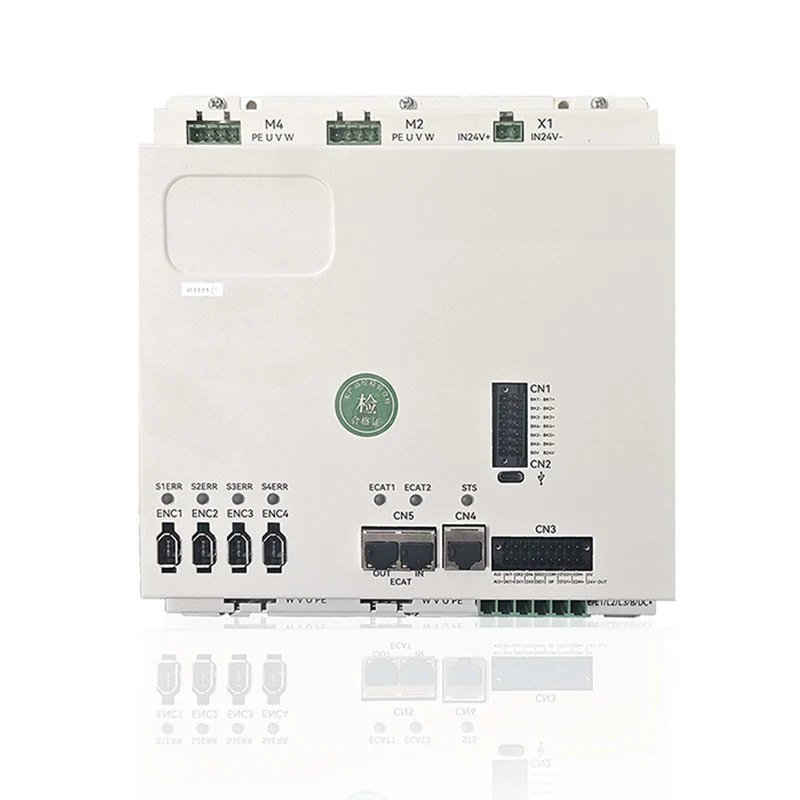
1. Understanding EtherCAT Laser Engraving Controllers
An EtherCAT laser engraving controller is a machine-control component designed to coordinate supported motion devices and processing signals through an EtherCAT industrial Ethernet network. Depending on its architecture, it may manage servo axes, digital and analog I/O, position feedback, trajectory execution, and laser-related control signals.
EtherCAT is designed for cyclic, deterministic industrial communication. Its Distributed Clocks (DC) mechanism can synchronize supported devices with high precision, making it useful for applications in which several axes must execute coordinated movements. Actual system performance depends on the controller, connected devices, configuration, and application requirements.
For laser engraving equipment, this matters because the machine must maintain a consistent relationship between the commanded path, actual mechanical movement, and laser energy delivered to the workpiece. A controller that coordinates these functions effectively can help reduce contour inconsistencies and improve repeatability.
What Does the Controller Typically Manage?
- Motion control: Coordinates X, Y, Z, rotary, or other supported axes according to the machine configuration.
- Servo communication: Exchanges position commands, feedback values, status information, and supported drive parameters.
- Laser coordination: Manages supported laser enable, modulation, trigger, or power commands.
- Digital and analog I/O: Connects compatible sensors, limit switches, interlocks, and auxiliary devices.
- Process sequencing: Coordinates motion, positioning, engraving, and other programmed machine operations.
Not every controller supports every function. Buyers should confirm the available interfaces, supported protocols, software functions, and hardware limits in the specific model documentation before designing the machine.
2. How the Controller Coordinates Motion and Laser Output
Laser engraving involves more than moving a beam along a programmed path. The machine must convert design data into motion commands and ensure that laser activity corresponds to the intended processing position. EtherCAT can help coordinate this process when the controller, servo drives, and laser interface are designed to work together.
Step 1: Convert Design Data into a Processing Path
The workflow generally starts with a design or processing file. Compatible control software interprets the geometry, defines the engraving path, and generates the commands needed by the motion system. Depending on the equipment, the workflow may include line segments, arcs, curves, hatch patterns, and repeated processing passes.
Path quality is important. Excessively dense commands, unsuitable acceleration settings, or poorly configured corner transitions can create unnecessary motion disturbances and reduce processing efficiency.
Step 2: Exchange Motion Data over EtherCAT
The controller exchanges cyclic process data with supported EtherCAT devices. Depending on the network configuration, this information may include target positions, drive status, control words, actual positions, and other feedback values.
Using a suitable industrial communication architecture can reduce dependence on multiple independent control connections. It can also make the behavior of a multi-axis system easier to coordinate and diagnose.
Step 3: Synchronize Supported Devices
Distributed Clocks provide a hardware-assisted mechanism for aligning local clocks across compatible EtherCAT devices. This can help coordinate servo operations and other time-sensitive activities.
However, synchronized clocks alone do not ensure that the laser fires at the correct point. The controller must also implement the appropriate path-to-laser coordination strategy, and the laser source must respond within the timing requirements of the application.
Step 4: Match Laser Output to the Processing Path
Laser power and emission timing must correspond to the commanded movement. During acceleration, deceleration, cornering, and changes in processing direction, an unsuitable control strategy can lead to inconsistent energy distribution.
Depending on the laser source and controller design, synchronization may use digital trigger signals, analog commands, pulse-width modulation, hardware timing outputs, or a supported communication interface. The appropriate method depends on the laser's electrical and timing specifications.
Step 5: Monitor Feedback and Machine Status
During operation, the controller and connected devices may report position, servo alarms, I/O states, network conditions, and process status. These signals help the machine respond to faults and support troubleshooting.
Safety-critical functions must be implemented through appropriate safety-rated components and validated circuits. Ordinary EtherCAT communication or a standard software command should not be assumed to provide a certified safety function.
3. Production Problems It Can Help Solve
For equipment manufacturers, the real value of an EtherCAT laser engraving controller lies in solving practical production challenges rather than simply adding a newer communication technology.
More Consistent Engraving Quality
When motion and laser output are poorly coordinated, the workpiece may show uneven line thickness, inconsistent darkness, distorted corners, or unwanted marks during direction changes. A properly configured controller can coordinate the motion trajectory and laser commands more consistently, helping reduce these problems.
Results still depend on optical performance, material characteristics, focus, speed, power settings, and mechanical accuracy. Testing on representative materials is necessary to determine the actual improvement.
Better Coordination Across Multiple Axes
Some engraving systems require multiple axes to move together, particularly large-format machines, rotary engraving equipment, and systems with specialized fixtures. Supported EtherCAT synchronization and motion functions can simplify coordinated movement when the controller and drives provide the required capabilities.
A More Structured Control Architecture
Consolidating compatible motion and I/O devices on an industrial network can reduce the number of separate communication connections. It may also make system expansion and diagnostics more manageable, provided that the network topology, device count, and process-data requirements are planned correctly.
More Predictable Troubleshooting
Drive status, communication errors, feedback values, and controller alarms can help engineers identify whether a fault originates in motion configuration, electrical wiring, network communication, or the laser interface. Clear diagnostic information can shorten commissioning and maintenance work.
Potential Improvements in Throughput
Higher production output is not achieved simply by increasing the communication speed. The full machine must support the intended trajectory, acceleration, laser response, thermal load, and material-processing requirements.
When these elements are matched correctly, coordinated control can help reduce unnecessary delays, improve path execution, and make cycle times more consistent.
4. Applications Across Different Industries
EtherCAT-based laser engraving control may be suitable for a range of industrial applications. The appropriate controller configuration depends on the process, required precision, laser source, motion hardware, and production environment.
Electronic components and enclosures may require clear serial numbers, identification codes, logos, or traceability information. Consistent positioning and suitable laser control help support repeatable marking, especially when the production process includes frequent changes between designs.
Metalworking applications may involve part numbers, manufacturing data, decorative patterns, or identification marks. Motion stability, focus control, laser-material compatibility, and the required mark depth all influence the final result.
Plastic housings, panels, and molded products often require controlled marking to prevent excessive melting, discoloration, or surface damage. The correct process settings depend on the polymer, additives, laser wavelength, and required mark quality.
Production lines may need variable text, batch codes, dates, or other product information. Controller selection should consider processing speed, integration with line controls, signal timing, and the capabilities of the marking equipment.
Machine builders developing customized engraving platforms may benefit from coordinated motion control, modular I/O, and a clearly defined communication architecture. This is particularly relevant when integrating several axes or planning future equipment upgrades.
These applications are examples, not a guarantee that every controller supports every process. Always confirm the model's intended use and compatibility before specifying it for a machine.
5. How to Choose the Right EtherCAT Laser Engraving Controller
Choosing a controller based on price or communication protocol alone can lead to expensive redesigns. A more reliable approach is to evaluate the complete machine configuration and its operating requirements.
| Selection Factor | What to Check | Why It Matters |
|---|---|---|
| Axis capacity | Supported axes, interpolation, and expansion limits | Ensures the controller can handle the intended machine layout. |
| Servo compatibility | Supported drive profiles, operating modes, and feedback functions | Reduces integration problems during commissioning. |
| Communication cycle | Supported cycle times, process-data size, and device response | Helps determine whether the control architecture meets application timing needs. |
| Clock synchronization | Distributed Clocks support and synchronization configuration | Important for coordinated operations requiring precise timing. |
| Laser interface | Digital, analog, PWM, trigger, or supported communication interfaces | Ensures the controller can issue the commands required by the laser source. |
| Software compatibility | Programming environment, motion functions, and file workflow | Affects development effort and operator workflow. |
| Diagnostics | Alarm information, feedback monitoring, and troubleshooting tools | Helps reduce downtime and simplify maintenance. |
| Environmental requirements | Operating temperature, enclosure, grounding, and EMC requirements | Supports reliable operation in the intended installation environment. |
| Future expansion | Available network capacity, I/O resources, and software licensing | Helps avoid replacing the controller when the machine is upgraded. |
Calculate the Required Motion Performance
Before selecting a controller, define the maximum operating speed, acceleration, path complexity, positioning tolerance, and expected production cycle. These parameters provide a more useful engineering baseline than choosing a product solely by its advertised maximum speed.
For example, the relationship between timing error and motion error can be expressed as:
Approximate position error = motion velocity × timing error
If a moving axis travels at 200 mm/s and a command is delayed by 100 microseconds, the corresponding travel during that interval is approximately 0.02 mm, or 20 micrometers.
This is an illustrative calculation, not a prediction of total engraving error. Actual contour error depends on the motion direction, control architecture, servo response, and other system factors.
Verify the Laser Interface Before Ordering
One of the most common integration mistakes is assuming that all laser sources accept the same control signals. Different sources may use different voltage levels, input impedances, modulation methods, enable logic, or timing requirements.
Obtain the laser manufacturer's interface documentation and compare it with the controller's electrical specifications. If an interface converter or isolated output stage is required, account for its response time and electrical characteristics in the design.
Consider Total Integration Cost
The purchase price is only one part of the cost. Engineering time, software development, cabling, additional interface hardware, commissioning, training, and long-term support can have a significant effect on the overall project budget.
A controller with suitable documentation, clear compatibility requirements, and practical diagnostic tools may reduce integration effort even when its initial price is not the lowest.
6. System Integration and Commissioning
A systematic commissioning process helps identify compatibility problems before they affect production equipment or workpieces. The following workflow provides a practical starting point for machine builders.
Step 1: Document the Machine Architecture
List every axis, servo drive, feedback device, I/O module, laser source, sensor, and communication interface. Record the required functions and the documentation available for each device.
Step 2: Check Network and Device Compatibility
Confirm that the controller supports the intended EtherCAT devices and their required operating modes. Check the supported device profiles, process-data mappings, network topology, and synchronization features.
Do not assume that a connector labeled Ethernet guarantees EtherCAT compatibility. Standard Ethernet communication, EtherCAT communication, and application-level device support are different considerations.
Step 3: Configure Motion Parameters
Set axis directions, travel limits, scaling, homing procedures, acceleration, deceleration, and relevant servo parameters. Verify actual movement at a conservative speed before running complex trajectories.
Step 4: Test Laser Signals Independently
With the laser emission safely disabled where appropriate, verify signal polarity, enable logic, command ranges, and timing behavior. Follow the laser manufacturer's instructions and the machine's validated safety procedures when testing actual emission.
Step 5: Tune the Complete Processing Path
Start with simple shapes and straight lines before testing curves, sharp corners, high-speed patterns, and production files. Compare commanded paths with actual results and adjust motion and laser parameters based on measured performance.
Step 6: Validate Fault Handling
Test expected fault scenarios, including drive alarms, communication loss, limit-switch activation, and abnormal laser interface conditions. Verify that the machine enters the intended state and that recovery procedures are clear to operators.
7. Common Problems and Practical Solutions
Even a well-designed EtherCAT laser engraving system may require tuning during installation. The key is to isolate the problem instead of changing multiple parameters without a clear diagnostic process.
| Observed Problem | Possible Causes | Recommended Checks |
|---|---|---|
| Uneven engraving depth or darkness | Inconsistent laser energy, focus variation, material differences, or speed changes | Verify power settings, motion speed, focus, material consistency, and laser response. |
| Distorted corners | Unsuitable acceleration, servo tuning, or laser timing | Test corner transitions, path planning, axis response, and laser modulation behavior. |
| Unexpected servo alarms | Incorrect parameters, wiring issues, drive incompatibility, or excessive mechanical load | Review alarm codes, drive configuration, feedback wiring, and mechanical movement. |
| EtherCAT communication faults | Incorrect topology, cable problems, power instability, or configuration mismatch | Inspect network status, device configuration, cabling, connectors, and power supply. |
| Laser output does not follow motion | Incorrect signal mapping, unsuitable trigger logic, or insufficient interface response | Measure control signals and compare command timing with the laser specifications. |
| Performance deteriorates at high speed | Mechanical vibration, trajectory limits, processing delays, or insufficient tuning | Increase speed gradually while monitoring motion, feedback, vibration, and engraving quality. |
Separate Communication Problems from Process Problems
A network fault and a poor engraving result are not necessarily related. If communication and servo status remain normal, investigate motion tuning, laser response, optical alignment, and material parameters. If network errors or drive faults appear, resolve those issues before evaluating high-speed engraving quality.
Keeping records of controller settings, firmware versions, network configuration, alarm histories, and successful test parameters also makes future maintenance more efficient.
8. Maintenance and Long-Term Reliability
Reliable production depends on maintaining the complete control system, not just the controller itself. A preventive maintenance plan should cover electrical connections, cooling, mechanical condition, software configuration, and the operating environment.
- Inspect cables and connectors: Look for looseness, abrasion, damaged shielding, and contamination.
- Check grounding and EMC practices: Follow the equipment manufacturers' recommendations for protective grounding, cable routing, and shielding.
- Monitor alarms and device status: Investigate recurring communication errors and servo warnings instead of repeatedly resetting them.
- Protect configuration files: Back up controller programs, axis settings, device configurations, and approved production parameters.
- Review mechanical wear: Check guides, bearings, couplings, belts, and other components that can influence motion accuracy.
- Control environmental conditions: Maintain suitable temperature, ventilation, and enclosure protection according to component specifications.
- Validate changes before production: Test software updates, parameter changes, and replacement devices before returning the machine to normal operation.
For equipment operating in multiple shifts, documented maintenance intervals and repeatable acceptance tests can help identify performance changes before they cause significant scrap or downtime.
9. Frequently Asked Questions
1. What is an EtherCAT laser engraving controller used for?
It coordinates supported motion axes, industrial communication devices, and laser-related control signals in engraving equipment. Depending on the model, it may also support feedback monitoring, I/O management, trajectory execution, and machine sequencing.
2. How does EtherCAT improve laser engraving performance?
EtherCAT supports deterministic cyclic communication and, on compatible devices, precise clock synchronization. These capabilities can help coordinate motion and processing signals. The final result also depends on mechanical accuracy, servo tuning, laser response, and the processing method.
3. Can an EtherCAT controller work with different laser sources?
Potentially, but compatibility must be confirmed for each combination. Check the laser source's electrical interfaces, modulation method, trigger requirements, command ranges, and timing specifications against the controller's supported outputs and software functions.
4. Does every EtherCAT device support Distributed Clocks?
No. Distributed Clocks support depends on the device hardware and implementation. Confirm which devices support the required synchronization functions and verify the configuration of the complete network.
5. How many axes can an EtherCAT laser engraving controller support?
The supported number of axes depends on the controller model, motion software, processing capacity, and configuration. Confirm the rated axis count, interpolation capabilities, and expansion options for the specific model rather than assuming all EtherCAT controllers have the same capacity.
6. What information should buyers provide when requesting a quotation?
Useful information includes the intended application, number of axes, servo drive models, laser source model, required control interfaces, target speed, positioning requirements, software environment, and expected production conditions. Existing wiring diagrams and device lists can also help the supplier assess compatibility.
7. Is EtherCAT enough to guarantee high engraving accuracy?
No. EtherCAT can provide a suitable communication and synchronization foundation, but accuracy also depends on the mechanical structure, motion-control algorithms, feedback devices, optical system, laser parameters, calibration, and material properties.
8. How can manufacturers reduce integration time?
Start with a documented system architecture, confirm device compatibility before ordering, use the recommended configuration tools, test motion and laser signals separately, and commission the system in stages. Clear diagnostic records and supplier technical support can further reduce troubleshooting time.
10. Build a More Reliable Laser Engraving System
Selecting an EtherCAT laser engraving controller is ultimately about matching control capability to the real requirements of the machine. Axis capacity, communication timing, device compatibility, laser interfaces, diagnostic functions, and long-term support should all be considered before a purchase decision is made.
For equipment manufacturers, OEMs, and industrial automation integrators, early compatibility checks can prevent avoidable engineering changes and help create a more stable production platform. A well-planned control architecture also makes commissioning, troubleshooting, and future upgrades easier to manage.
When evaluating a solution, define the required processing performance first, document the existing hardware, and confirm that the selected controller supports the necessary motion and laser-control functions.
Looking for an EtherCAT Laser Engraving Control Solution?
Shenzhen Shenyan CNC Co., Ltd. is a potential point of contact for businesses evaluating CNC and laser motion-control solutions. Before selecting a product, prepare your machine specifications, axis requirements, servo drive information, and laser interface details so that the appropriate configuration can be assessed.
Whether you are developing new engraving equipment, upgrading an existing control system, or planning an OEM integration project, clear technical requirements are the first step toward finding a suitable solution.
Visit the official website to learn more about the company and its available products, and contact us to discuss your application, compatibility requirements, and project needs.
Contact Us